Move objects
To move any shape, text box, or group of objects, select it and drag it anywhere on the drawing canvas.
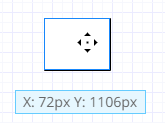
While you’re moving a shape, text box, or group of objects, you see a bounding box and the XY coordinates of the upper-left corner of that shape or group or group of objects. If Snap to grid is enabled, objects automatically move in increments of 10 pixels. If Drawing guides are enabled, green lines help you align the shape you are moving to the edges or center of other objects.
You can also specify an exact location for any shape or group of shapes.
1. Select the shape or group of shapes and select the properties  button.
2. In the X box, enter the X coordinate for the upper-left corner of the shape or group.
3. In the Y box, enter the Y coordinate for the upper-left corner of the shape or group.