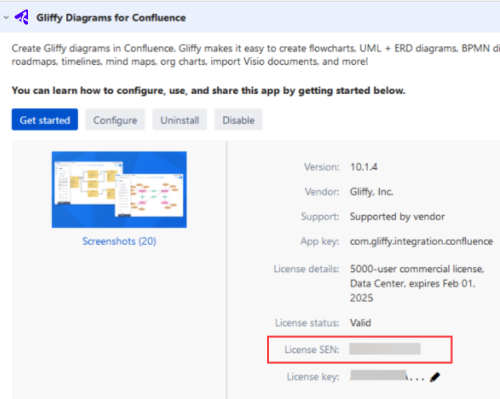
Locate your Support Entitlement Number (SEN)
If you ever need to contact Gliffy support, you will need your Support Entitlement Number (SEN) or Entitlement Number.
Locate your Entitlement Number in the Gliffy editor
The following steps apply to both Gliffy for Confluence Cloud and Gliffy for Confluence Data Center.
-
Navigate to the Gliffy editor.
-
From the top bar menu, select Help.
-
Your Gliffy Diagram Entitlement number can be found under Customer ID.
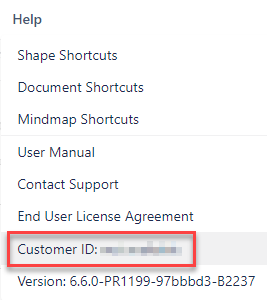 If the Customer ID box shows "not available", users with Atlassian Admin rights (Confluence Cloud) or Confluence Admin rights (Confluence Data Center) can retrieve the Entitlement number from Confluence. See the steps below.
Locate your Entitlement Number in Confluence administration (for Confluence Cloud)
-
In the Confluence administration menu, go to the Atlassian administration section and select Billing.
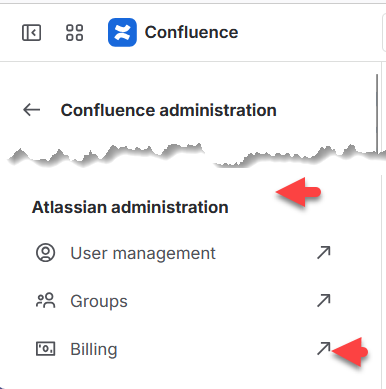
-
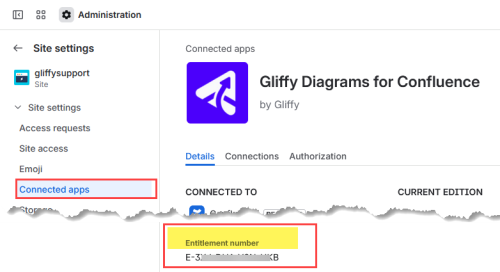
In the Atlassian admin page for your cloud site, in Site settings, select Connected apps.
-
Select View app details.
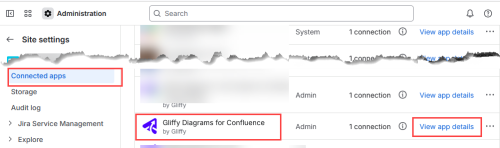
Your Entitlement number is shown:
Locate your Entitlement Number in Confluence administration (for Confluence Data Center)
-
In the Confluence administration menu, go to Manage Apps.
-
From the list of apps, expand Gliffy Diagrams for Confluence.
-
To view the SEN, select Get started.