Export Gliffy diagram data from Data Center
Use this procedure to export Gliffy diagram data from your Confluence Data Center instance into a file that you can import into the Gliffy Zero Egress app.
Prepare the Data Center instance
Before you start the export, ensure that site reindexing is complete on your Confluence Data Center instance.
Gliffy export relies on Confluence site reindexing. If reindexing is not complete, some diagrams might be missing from the export.
For indexing instructions, see Content Index Administration.
Export the data
-
In Confluence Data Center, select Confluence administration > General configuration.
-
Under Gliffy plugin, select Migration.
-
Select Export data.
-
When the export is completed, select Download data and save the .zip file locally.
The exported .zip file expires 12 hours after export if you do not download it. If the .zip file expires, export the .zip file again to download it.
Do not edit the contents of the exported .zip file or change its file name.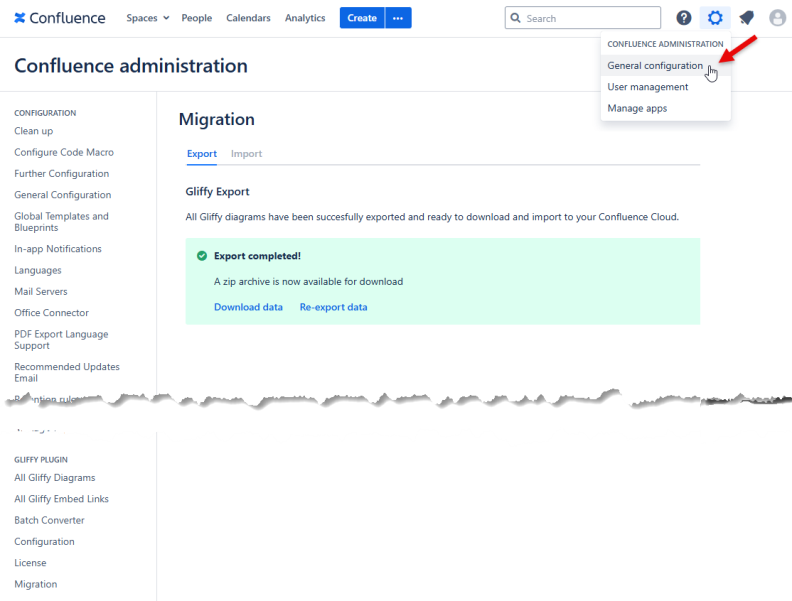
What to do next
To complete the migration of Gliffy diagrams from Confluence Data Center to the Zero Egress app, Import Gliffy diagram data to Zero Egress.