Move Gliffy diagrams from Jira to Confluence
You can export and import diagrams in Gliffy format (.gliffy) for reuse within Gliffy. Other formats such as PNG, JPG, and SVG are available for viewing only and cannot be re-imported as editable diagrams.
End users can move the diagrams as updates to diagrams are needed.
Export a diagram from Jira
-
Open a Gliffy diagram in Jira.
-
In the Gliffy editor, select File, and then select Export.
-
Select Gliffy format (.Gliffy). You can also export as PNG, JPG, or SVG for reference, but these cannot be imported back into Gliffy.

The exported file is saved in your browser’s default download folder.
Import a diagram to Confluence
-
In Confluence , start a new Gliffy diagram. See Add diagrams to a Confluence page.
-
On the Gliffy start screen, select Import a Diagram.
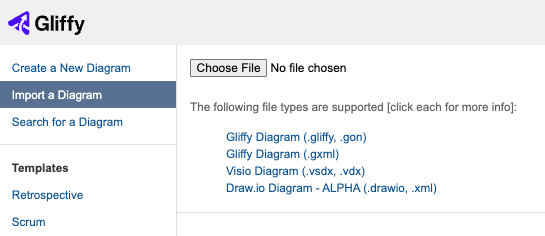
-
Select Browse and locate the exported
.Gliffyfile from Jira. -
Double-click the file to select it.
The diagram opens in the Gliffy editor within Confluence.