Generate network logs (HAR files)
When you contact Gliffy support (see Contact support), we may request that you send us an HTTP ARchive (HAR) file. These files are network logs that track your web browser's interaction with a website. These files help us troubleshoot and identify the root cause of issues with Gliffy.
For detailed steps on how to find console logs in various web browsers, see Generate console logs.
Generate HAR files
Select your web browser below and follow the steps to generate this file and then send it to us.
 Chrome
-
In your web browser, open the Gliffy diagram that is causing the issue.
-
On your keyboard, select F12 to open your web browser console's.
-
In Chrome Menu in the top right corner, select Tools - Developer Tools.
-
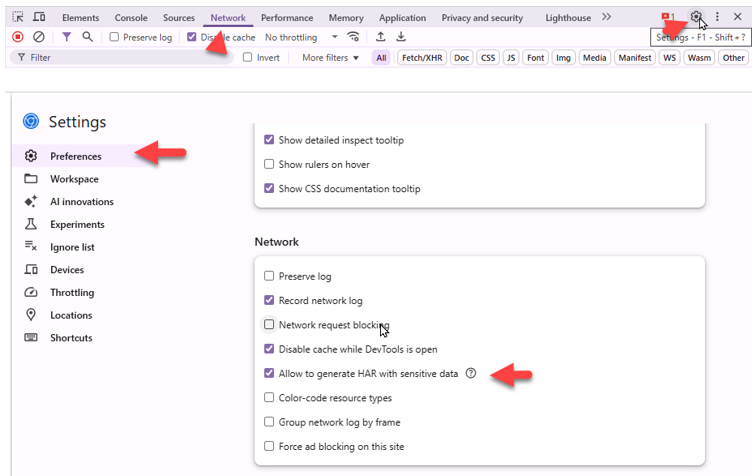
At the top of the pane that opens, select the Network tab, and then the settings icon in the top right corner.
-
In Settings, select Preferences. Alternatively, select F1.
-
In the Network section, select the checkbox:
-
Check the box for Disable cache while DevTools is open.
-
Check the box for Allow to generate HAR with sensitive data.
Check Allow to generate HAR with sensitive data to get a HAR file that is not sanitized. Chrome will include the content of HTTP responses in the file. This information is needed to determine the source of an issue. -
-
-
On your keyboard, select F5 to refresh the page and to start capturing network traffic for the web page.
-
In Gliffy, perform the steps that trigger the issue or performance problem.
-
In the Network tab, select the export icon, and then Export HAR (with sensitive data).
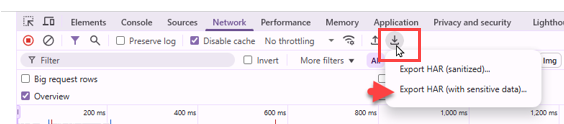
The information from the Network tab is saved as HAR.
-
Attach the HAR file in your Gliffy support ticket.
Firefox
-
In your web browser, open the Gliffy diagram that is causing the issue.
-
On your keyboard, select F12 to open your web browser's console.
-
At the top of the pane that opens, select the Network tab.
-
On your keyboard, select F5 to refresh the page and to start capturing network traffic for the web page.
-
In Gliffy, perform the steps that trigger the issue or performance problem.
-
In the console pane, right-click where the rows of network traffic are shown and choose Save all as HAR.
-
Before sending the HAR file to Gliffy, remove or censor any sensitive information (such as passwords or other confidential information) using a plain text editor.
-
Attach the HAR file in your Gliffy support ticket.
Edge
-
In your web browser, open the Gliffy diagram that is causing the issue.
-
On your keyboard, select F12 to open your web browser's console.
-
Select the Network tab.
-
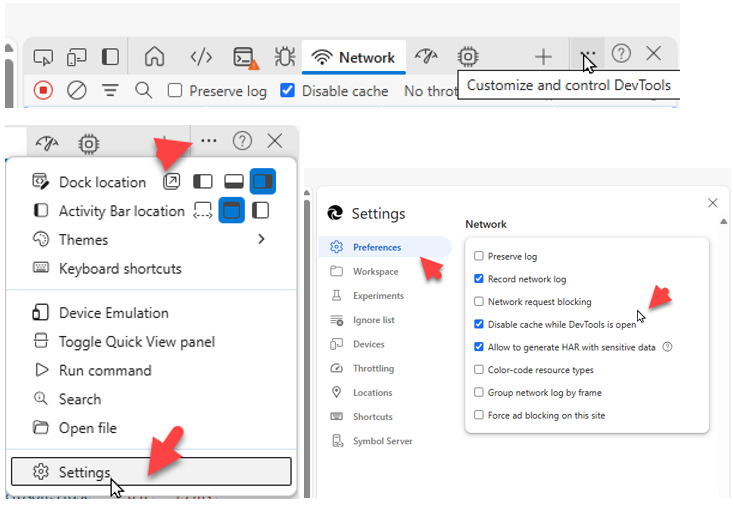
Select the three-dot-menu (Customize and control DevTools) - Settings - Preferences. Alternatively, select F1.
-
On your keyboard, select F5 to refresh the page and to start capturing network traffic for the web page.
-
In Gliffy, perform the steps that trigger the issue or performance problem.
-
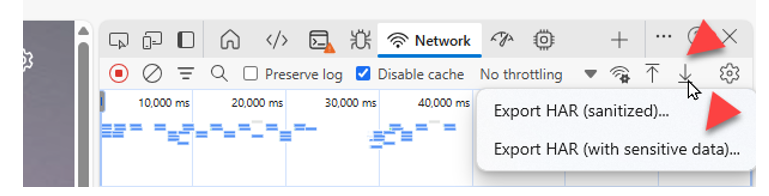
In the Network tab, select the export icon, and then Export HAR (with sensitive data).
-
Attach the HAR file in your Gliffy support ticket.
Safari
-
In your web browser, open the Gliffy diagram that is causing the issue.
-
From the Safari menu, select Develop > Show Web Inspector.
If you don't see the Develop menu, choose Safari > Preferences > Advanced, and then, select Show Show Develop menu in menubar to add it to your Safari Menu Bar. -
In the Web Inspector, select the Network tab.
-
On your keyboard, select Command+R to refresh the page and to start capturing network traffic for the web page.
-
In Gliffy, perform the steps that trigger the issue or performance problem.
-
In the console pane, hold Ctrl and select where the rows of network traffic are shown. Then, select Export as HAR File.
-
Before sending the HAR file to Gliffy, remove or censor any sensitive information (such as passwords or other confidential information) using a plain text editor.
-
Attach the HAR file in your Gliffy support ticket.
Opera
-
In your web browser, open the Gliffy diagram that is causing the issue.
-
On your keyboard, select Ctrl+Shift+i to open your web browser's console.
-
At the top of the pane that opens, select the Network tab.
-
Select the Disable cache check box to prevent further caching of the web page.
-
On your keyboard, select F5 to refresh the page and to start capturing network traffic for the web page.
-
In Gliffy, perform the steps that trigger the issue or performance problem.
-
In the console pane, right-click where the rows of network traffic are shown and select Save all as HAR with content.
-
Before sending the HAR file to Gliffy, remove or censor any sensitive information (such as passwords or other confidential information) using a plain text editor.
-
Attach the HAR file in your Gliffy support ticket.