Find and access the Gliffy Diagram agent
Before you create diagrams with the Gliffy Diagram agent, ensure that the agent is available in your Confluence space and that you configured the required settings.
Prerequisites
Before you use the Gliffy Diagram agent:
-
Ensure you use Gliffy for Confluence Cloud.
-
Confluence administrator must approve the agent's access to your Confluence space.
-
Ensure the Rovo Diagram Agent setting is enabled in Confluence Administration.
To learn more, see Configure Gliffy on Confluence Cloud.
Access the Gliffy Diagram agent
After the agent is enabled, you can access it from any page in your Confluence space.
-
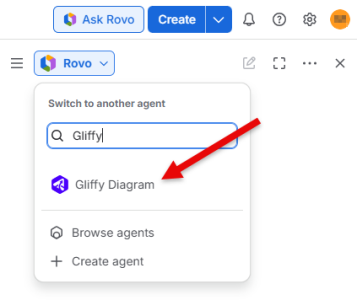
In your Confluence space, select Ask Rovo.
-
In the Rovo pane, find and select the Gliffy Diagram agent.
A chat window opens where you can communicate with the agent.
Troubleshooting
If you cannot find the Gliffy Diagram agent or Rovo, verify that you completed all prerequisites in this article and try again.
What to do next
If you can find and access the Gliffy Diagram agent, you can Create a diagram with the Gliffy Diagram agent or learn How the Gliffy Diagram agent works.